


To buy credits, you must be logged in to your account. From the blue menu located at the top of the page, click on ‘CREDITS & SUBSCRIPTIONS’, and then on ‘MY CREDITS’ from the white menu.
On this page, you may:
- View the number of credits remaining on your account
- Select the desired subscription pack from our list of available packages
- Buy your credits in a few clicks
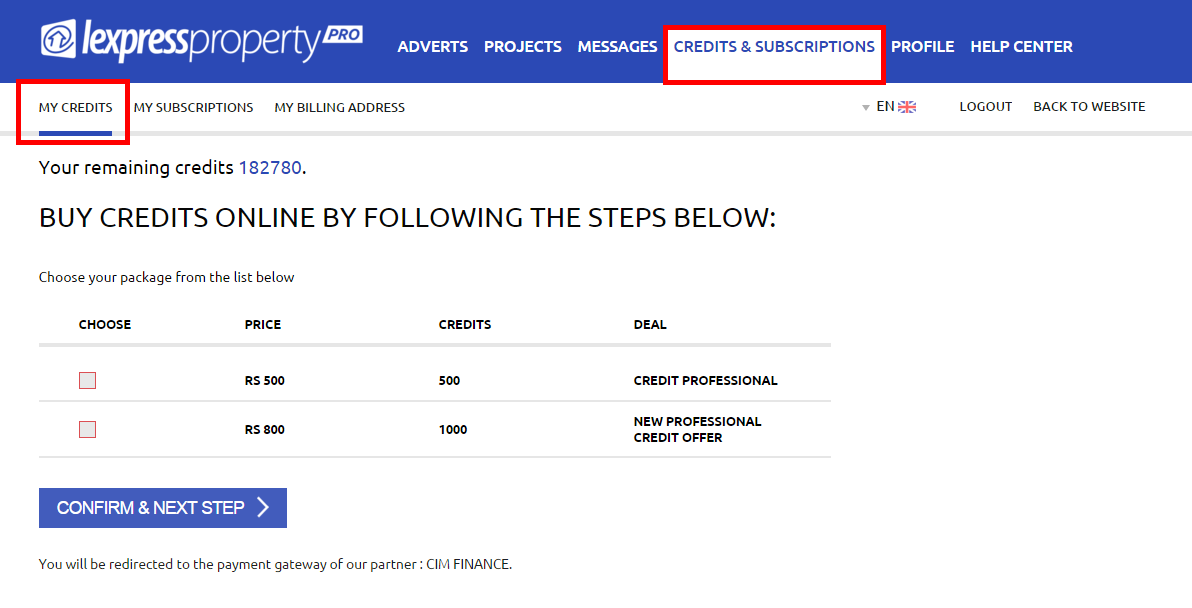
To buy credits, you must select the subscription package in which you are interested. Then, click on the ‘CONFIRM & NEXT STEP’ button. You will be redirected to the payment gateway of our partner: CIM FINANCE where you just have to follow the instructions displayed on the screen to complete your transaction. NB: You must have a Credit Card to buy credits.